Assessment is where the organizer learns how this particular client lives and works: their habits and routines, how they see their situation, how they prefer to learn and organize, and their organizing, productivity and technology skills. It combines asking, observing and listening — with a focus on strengths as well as gaps. Everything designed later is built on what's learned here.
Domain II, Assessment, is 18% of the CPO® exam. It has four parts: understanding the client, evaluating the environment, identifying external factors, and determining the budget. Understanding the client is the largest, so it's split across two lessons. This one covers the first six items — habits and routines, the client's perception of the situation, personal preferences, and organizing, productivity and technology skills (II.A.1–6). Lesson 5 covers physical, mental-health and personal considerations.
Assessment exists for one reason: you can't design a system for someone you haven't understood. Two clients with identical-looking cluttered offices may need completely different solutions — one because they never developed a filing habit, the other because their system was built for someone who files and they're someone who piles. Assessment is how the organizer tells the difference.
On the exam, assessment answers usually beat implementation answers when the organizer doesn't yet know enough about the client. Buying containers, recommending an app or starting to sort before assessing is a classic wrong answer.
Free on YouTube Subscribe to get every lesson video in this course SubscribeHow Organizers Assess
Assessment usually happens during a first visit or a detailed video walk-through, building on the preliminary conversations in Domain I. Organizers combine three methods:
- Asking — open questions about how a space is used, what works, what doesn't, and what the client wants.
- Observing — what's actually there, where things land, how the client moves through the space. Always with permission: don't open drawers or cupboards without asking.
- Listening — to how the client describes their home and belongings, which reveals priorities, attachments and concerns.
| Assessment tool | Useful for |
|---|---|
| Guided walk-through | Seeing each space with the client explaining how it's used |
| Questionnaire or intake form | Routines, goals and preferences, completed before or during the visit |
| Rating scale | The client rating how each space feels to them — useful for perception (II.A.2) |
| Photos (with permission) | Planning and comparison — kept confidential (Lesson 18) |
| Time or activity log | Productivity assessment: where the client's time and attention actually go |
The assessment mindset
The organizer is curious, not critical. The client is the expert on their own life, and the organizer is learning how it works. A good assessment records strengths as well as problems: a kitchen that already works, or a calendar habit the client never misses, is something to build on.
How findings are written down matters too. Notes should be neutral and specific, because they'll be reviewed with the client in Domain III (Lesson 7):
| A useful note | An unhelpful note |
|---|---|
| "Mail lands on the kitchen counter by the door; bills are found by searching the pile." | "Kitchen is a mess." |
| "Opens closed filing drawers rarely; desk piles are searched quickly." | "Lazy about filing." |
| "Uses a wall calendar daily; never misses appointments." | (Strength not recorded) |
Habits and Routines (II.A.1)
How does the client's day actually run? A powerful question is simply: "Talk me through a normal weekday, from when you wake up." Where do keys, bags, mail and shoes land when they come home? When do laundry, bills and cooking happen? Who does them?
The organizer looks for patterns rather than faults. Two kinds of spot matter most:
- Landing spots — where things naturally end up: the counter by the door, the chair in the bedroom, the bottom stair.
- Working systems — routines that already function, even informally: mugs by the kettle, the same drawer for batteries every time.
| What you observe | What it tells you | Design implication |
|---|---|---|
| Shoes pile up by the back door | That's the real entry point | Shoe storage at the back door, not the front |
| Mail lands on the kitchen counter | Mail is opened in the kitchen | A simple mail station there |
| Clothes over the bedroom chair | "Worn once" clothes have no home | Hooks or a basket for in-between clothes |
| Mugs always by the kettle | A working system | Keep it — don't fix what works |
Habits are powerful. A system that works with them is far more likely to last than one that expects the client to change everything at once. Where a habit does need to change, the change is usually small and anchored to something the client already does (Lesson 13).
Perception of the Situation (II.A.2)
The client's view of the problem is part of the assessment, and it doesn't always match what the organizer observes.
| The client says | The organizer observes | A way to explore |
|---|---|---|
| "The whole house is chaos." | Most rooms work; paper is the real issue | "Which spaces bother you most day to day?" |
| "It's not that bad." | Blocked walkways; a trip hazard | Describe the specific safety concern gently and clearly |
| "It's just a bit messy." | Bills missed; documents can't be found | "How long did it take to find your last bill?" |
| "My kitchen's hopeless." | A well-used kitchen with one overfull cupboard | Point out what works; focus on the cupboard |
Both views matter. The client's perception shows what they care about, what motivates them and what success will feel like to them. The organizer's observation adds detail the client may not notice. The gap between the two is useful information, explored together with curiosity and without judgement. A rating scale — "how does each room feel, from 1 to 5?" — often makes the conversation easier.
One exception to simply accepting the client's view is safety. If the client underestimates a real risk, the organizer raises it — describing what they see, not labelling the client — and it becomes a priority in planning (Lessons 6 and 7).
Personal Preferences (II.A.3)
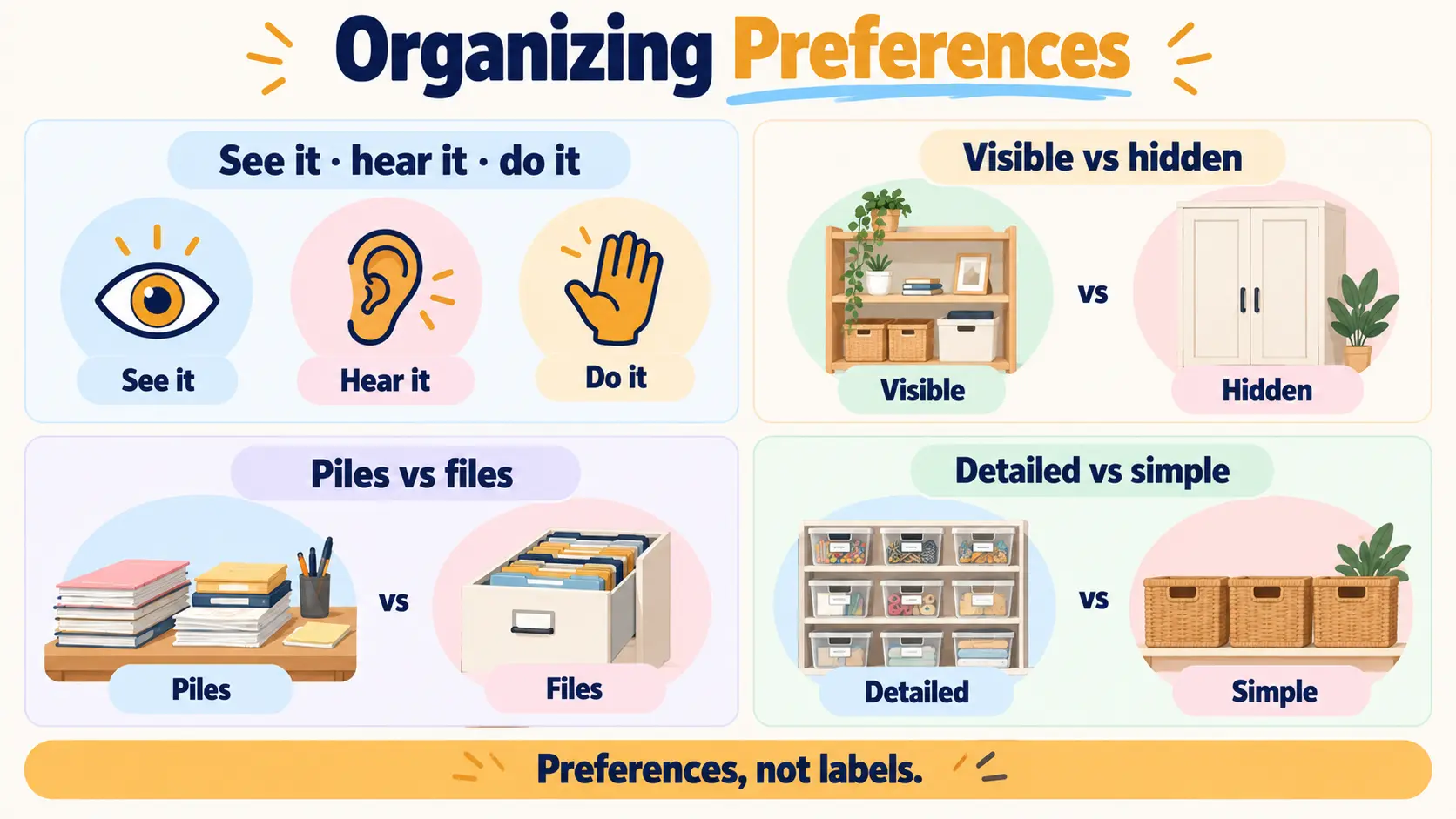
People take in information and relate to their belongings in different ways. The outline mentions learning styles and behavioural styles. They're best treated as preferences that shape how the organizer teaches and designs — not as fixed types, test results or diagnoses. Most people use a mix, and preferences can vary from one area of life to another.
- How they learnSome clients like to see a diagram or example; some prefer to talk it through; some learn by doing it themselves. Teach the system the way they take it in.
- Visible vs hiddenSome people remember only what they can see ("out of sight, out of mind") and do best with open or clear storage. Others feel calmer when things are out of view.
- Piles vs filesSome people naturally make piles and rely on remembering roughly where things are; others like everything filed away. Systems can be designed for either.
- Detail vs simplicitySome clients enjoy detailed categories and labels; others will only keep up a very simple system.
Discovering preferences
The most reliable evidence is what already works. A client whose only tidy area is an open bookshelf may be telling you they're visual. A client who keeps meticulous digital photo albums but loses paper may have strong digital skills and a paper problem. Asking helps too: "When you've learned something new, what helped it stick?"
Preferences shape design and teaching
| Preference | System design | Teaching approach |
|---|---|---|
| Visual, "out of sight, out of mind" | Open shelves, clear bins, vertical files, labels with pictures | Show it; leave a photo of the finished system |
| Prefers things hidden | Closed storage with clear labels outside | Walk through where each category lives |
| Piler | Labelled open trays or vertical files instead of drawers | Practise putting things in the "pile" spot |
| Learns by doing | Any — but the client sets it up with you | Hands-on practice; client does it while you watch |
| Wants simplicity | Few, broad categories; one-step put-away | Short, plain instructions |
Organizing, Productivity and Technology Skills (II.A.4–6)
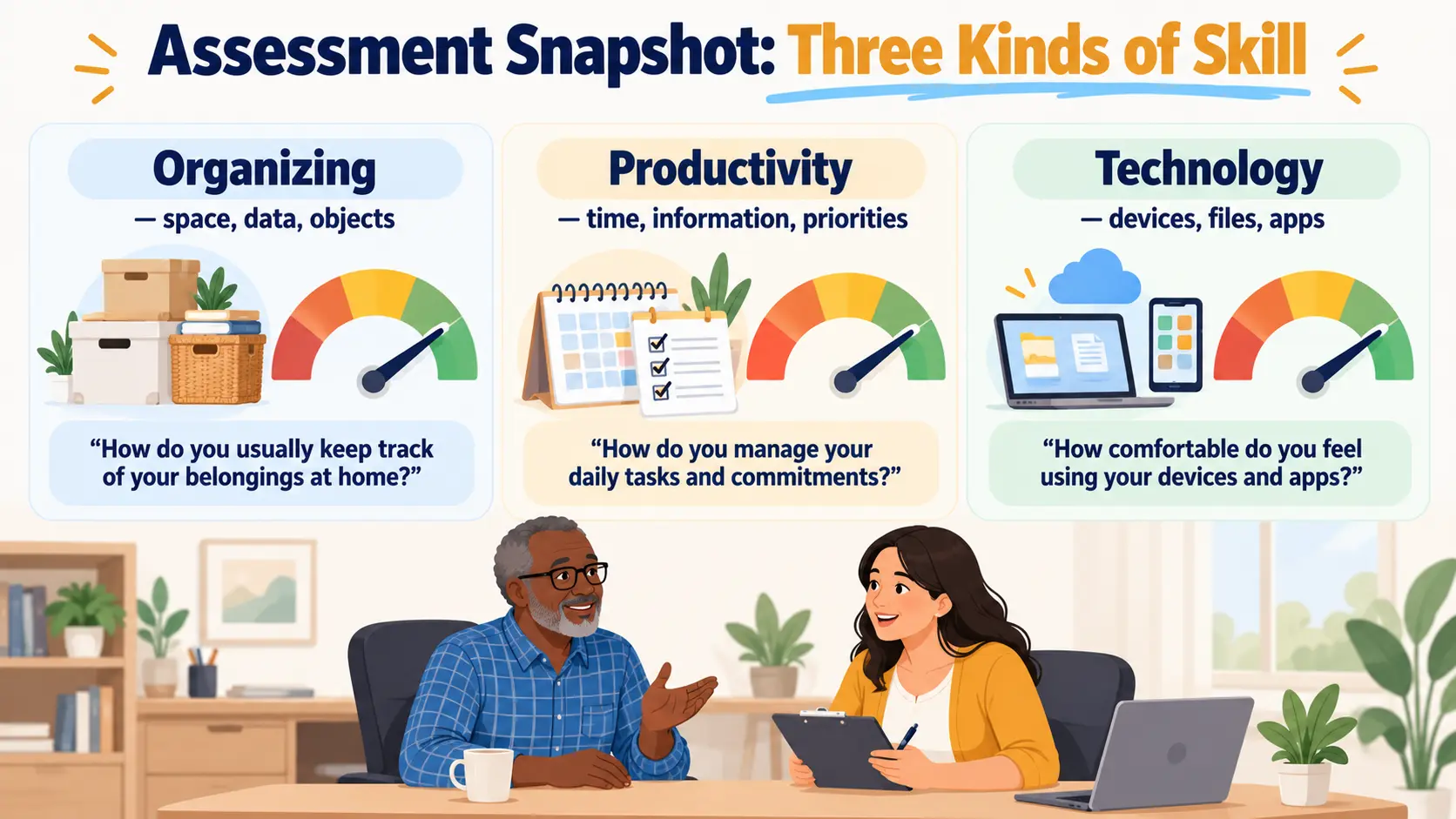
The outline asks the organizer to assess three kinds of skill. Each gives a different picture of where the client is now — and what they'll need to learn.
| Skill area | Covers | What to look for |
|---|---|---|
| Organizing skills (II.A.4) | Space, data and objects | Can they group like items, decide what to keep, give things a home and put them back? |
| Productivity skills (II.A.5) | Time, information and priorities | Do they plan, keep a calendar, track tasks, process paper and email, and prioritize? |
| Technology skills (II.A.6) | Devices, software and digital tools | How comfortable are they with files, cloud storage, apps and digital calendars? |
Memorize the split: organizing = space, data, objects; productivity = time, information, priorities. Exam questions often describe an activity and ask which kind of skill it is. Grouping utensils is organizing. Deciding which tasks matter most today is productivity.
Gauging the level
For each skill, it helps to note whether the client can do it independently, with support, or not yet. That tells the organizer what to build on, what to teach, and what the system must not depend on.
Matching tools to skills
Technology skills deserve special attention because they decide which tools will actually work. A client who struggles to find files on a computer isn't ready for an elaborate cloud system, and recommending one sets them up to fail. Equally, the organizer shouldn't assume skill levels from age, job or background. Plenty of older clients are confident with technology, and plenty of younger ones aren't. Assess first, then match tools to skills, and plan to teach whatever new skills the system needs (Lesson 8).
From Assessment to Plan
| Assessment finding | Feeds into |
|---|---|
| Habits and routines | Where things should live (Lesson 11) |
| Perception | What matters to the client; priorities (Lesson 7) |
| Preferences | How systems are designed and taught |
| Skills | What to build on, what to teach, which tools fit (Lessons 8, 12) |
| Strengths | Starting points and early wins |
Exam Traps for II.A.1–6
| If an answer… | …it's probably wrong because |
|---|---|
| Starts sorting or buying before assessing | You can't design for someone you haven't understood |
| Opens drawers without asking | Observe with permission |
| Expects the client to change routines to fit the design | Work with existing habits |
| Dismisses the client's view as exaggeration | Explore the gap without judgement |
| Uses closed drawers for a visual client | Design to the client's preference |
| Says the client just needs more discipline | Look for a mismatch between system and person |
| Calls prioritizing tasks an organizing skill | It's productivity: time, information, priorities |
| Recommends a cloud system before assessing tech skills | Match tools to skills |
10 questions in the style of the CPO exam. Score 70%+ to mark this lesson complete.
- Assessment (Domain II) is 18% of the exam; understanding the client is its largest part — you can't design for someone you haven't understood.
- Assess by asking, observing (with permission) and listening; write neutral, specific notes and record strengths as well as gaps.
- Habits and routines show where things should live — landing spots and working systems. Work with them, not against them.
- The client's perception and the organizer's observations can differ — explore the gap without judgement, and raise safety clearly.
- Treat learning and behavioural styles as preferences, discovered from what already works, that shape how you design and teach.
- Organizing = space, data, objects; productivity = time, information, priorities; plus technology. Gauge the level, don't assume it — and match tools to skills.
Before moving to Lesson 5:
- Walk through one room of your own home and note three landing spots and one working system.
- Decide whether you lean toward visible or hidden storage, and piles or files — and what evidence in your home shows it.
- Rate your own organizing, productivity and technology skills as independent, with support, or not yet, with one example each.
- Complete the knowledge check above and review any question you missed.