Professional organizers organize time and information as well as things. Paper, email and tasks all need a workflow: one place where things arrive, a regular habit of deciding what each item needs, and a clear home for what's left. Goals turn into priorities and tasks, and planning turns tasks into time on a calendar. The best tools are the ones that fit this client's skills and habits — and usually that means fewer systems, not more.
The CPO® credential covers productivity as well as physical organizing — the outline speaks of "organizing and productivity fundamentals" throughout Domain IV. This lesson covers three of them: process and workflow (IV.A.7), goal setting and prioritization (IV.A.8) and planning and time management (IV.A.9). The same principles from Lessons 10 and 11 carry over: consolidate first, give everything a home, and design for how the client really works.
Many clients describe a physical problem — a buried desk, a counter covered in post — that turns out to be a productivity problem underneath. Paper piles up because no one decides what each piece needs. Tasks slip because they live in five places. Days fill with urgent things while important ones wait. Organizing the space without fixing the flow just produces a tidy desk that's buried again in a month.
Free on YouTube Subscribe to get every lesson video in this course SubscribeProcess and Workflow
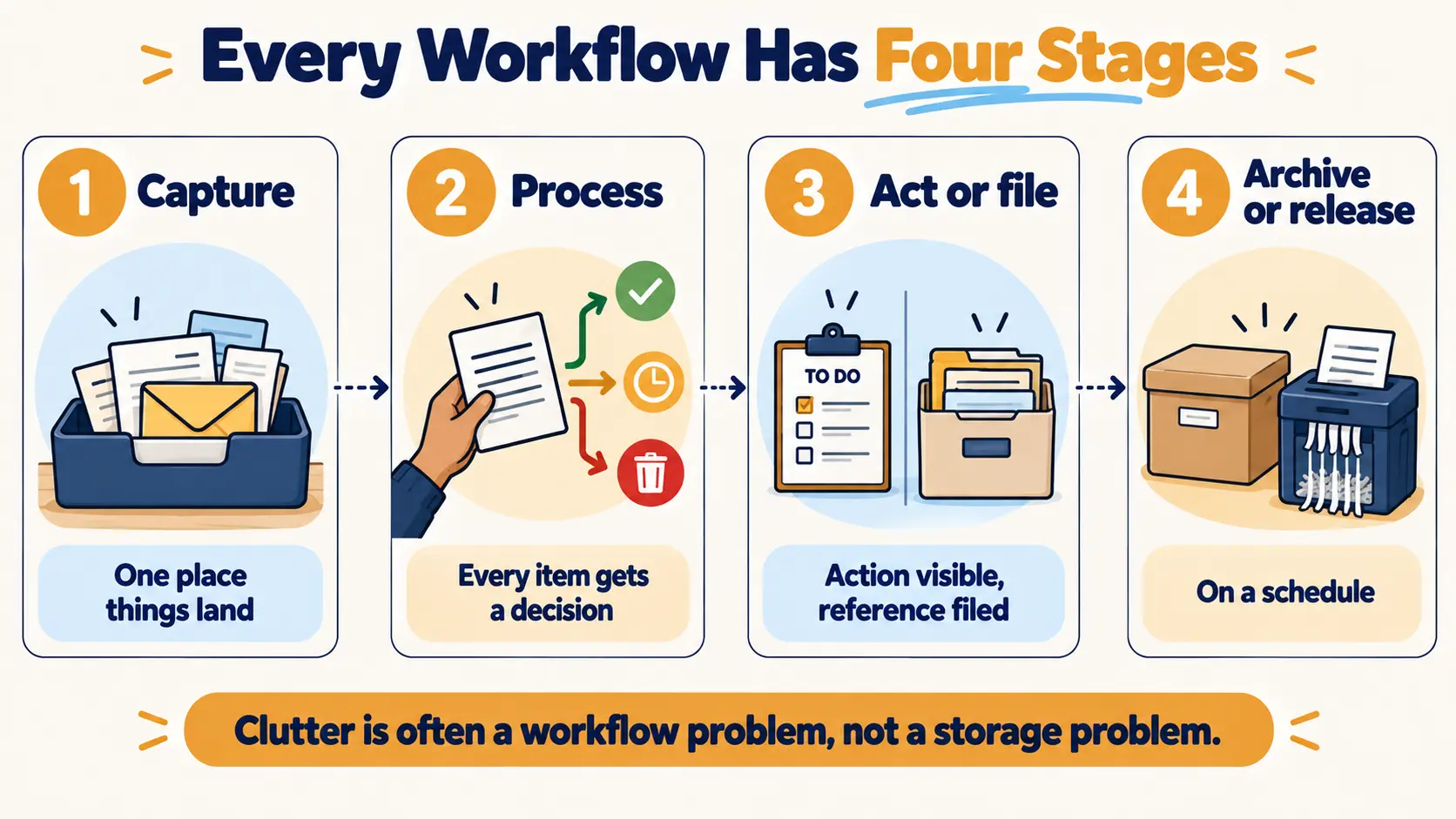
A workflow is the path information takes from the moment it arrives to the moment it's dealt with. Clutter on desks, kitchen counters and in inboxes is usually a workflow problem rather than a storage problem: items arrive faster than decisions get made about them.
Most workflows, whether for paper, email or tasks, follow the same four stages:
- 1. Capture — one place things landA single inbox tray for paper, one email inbox, one list or app for tasks. Multiple landing spots mean things get lost.
- 2. Process — decide what each item needsOn a regular schedule, every item gets a decision: act on it, file it for reference, pass it to someone else, or let it go.
- 3. Act or storeAction items go where they'll be seen and done. Reference items go into a simple filing system.
- 4. Archive or releaseFinished and old material is archived, shredded or deleted on a schedule, so active files stay lean.
Processing: one decision per item
Processing is where most workflows break down. The fix is to give every item exactly one decision, made once, on a regular schedule:
| Decision | When it fits | Where it goes |
|---|---|---|
| Do it now | It takes a couple of minutes or less | Done — then file or release |
| Schedule it | It needs time the client doesn't have right now | Action file plus a calendar or task-list entry |
| Delegate it | Someone else should handle it | Passed on, with a note to follow up |
| File it | No action needed, but worth keeping | Reference file |
| Release it | No action and no reason to keep | Recycling, or shredding if it holds personal information |
The schedule matters as much as the decisions. A daily two-minute sort of the mail and a weekly session for the action file keep a system working; "when I have time" usually means never.
Paper: action versus reference
The most useful distinction in paper management is between action and reference. Action papers need something done (pay, call, sign, reply, read). Reference papers just need keeping (warranties, records, manuals, certificates). Mixing them in one pile is how a bill ends up buried under a stack of old receipts.
| Action files | Reference files | Archive | |
|---|---|---|---|
| Holds | Papers needing a next step | Information to keep and look up | Records kept for a set period, rarely used |
| Examples | To pay, To call, To sign, To read | Home, Health, Vehicle, Insurance, Work | Past years' financial records |
| Location | Visible, close to where the client works | Filing drawer or box nearby | Deep storage, clearly labelled and dated |
| Reviewed | Often — daily or weekly | When needed; purged yearly | On a set schedule |
Reference files work best with a few broad categories and file names the client would actually think of ("Car", not "Automotive documentation"). Sensitive documents should be stored securely and shredded when no longer needed.
How long to keep documents is a common client question — and a scope trap. Retention requirements depend on the country, the type of document and the client's circumstances. An organizer helps set up the system and the schedule, but encourages the client to confirm what they must keep with an accountant, lawyer or the relevant authority. Never state a legal retention period as fact.
A worked example: a home paper station
A client's post lands on the kitchen counter, bills are paid late, and important letters get lost. A simple paper station near where the post is opened might include:
- One inbox tray — the only place incoming paper goes (capture).
- A recycling bin and a shred bag right beside it, so junk never reaches the counter (release).
- Three upright action folders — To pay, To do, To read — visible on the counter or wall (act).
- A small reference box or drawer nearby with broad categories in the client's words (store).
- A labelled archive box in deep storage for older records (archive).
- A routine: sort the post daily as it arrives, clear the action folders at a set weekly time.
Each piece maps to a stage of the workflow, the action papers are visible for a client who forgets what's out of sight (Lesson 4), and the whole station sits at the point of use (Lesson 11).
Email and digital information
Email follows the same pattern. Process the inbox on a schedule rather than reacting to every alert, and give each message one decision: delete or archive it, do it (if it takes a couple of minutes), delegate it, or move it to the task list or calendar for later. A short folder structure and unsubscribing from unwanted mail keep the volume down. Our guide to getting email overload under control walks through this in practice.
Goal Setting and Prioritization
Clients rarely struggle because they lack things to do. They struggle because everything feels equally urgent. Goal setting and prioritization give their time a direction.
Setting useful goals
Vague goals ("get organized", "be more productive") are hard to act on. Organizers help clients turn them into clear goals — a common framework is SMART: specific, measurable, achievable, relevant and time-bound. "Clear the dining table of paper and set up a weekly bill-paying routine by the end of the month" is something a client can plan around and see progress on.
It also helps to separate outcome goals (the result: a usable home office) from process goals (the habits that get there: 15 minutes of filing every Sunday). Process goals are more within the client's control and build the routines that Lesson 13 covers.
From vague to SMART: worked examples
| Vague goal | SMART version |
|---|---|
| "Get on top of paperwork." | "Set up action and reference files and clear the backlog by the 30th, then pay bills every Sunday." |
| "Be more productive at work." | "Block 9–11 am on three weekdays for client projects, with email closed, for the next month." |
| "Have a tidier home." | "Do a ten-minute evening reset of the living room and kitchen five nights a week." |
| Outcome goal (the result) | Process goal (the habit that gets there) |
|---|---|
| A clear dining table | Sort the post into the station every day |
| No late bills | Pay bills from the "To pay" folder every Sunday |
| A usable home office | Fifteen minutes of filing every Friday |
Prioritizing
- Urgent–important matrixSorts tasks into four groups: urgent and important (do now), important but not urgent (schedule it), urgent but not important (delegate or minimize), neither (drop it). Its real value is protecting time for important work that has no deadline pushing it.
- ABC rankingMark each task A (must do), B (should do) or C (nice to do), and work through the A's first.
- Most important tasksChoose the one to three tasks that would make the day a success, and do them before anything else.
- Deadline and dependency orderSome tasks must happen before others can start. Sequence those first.
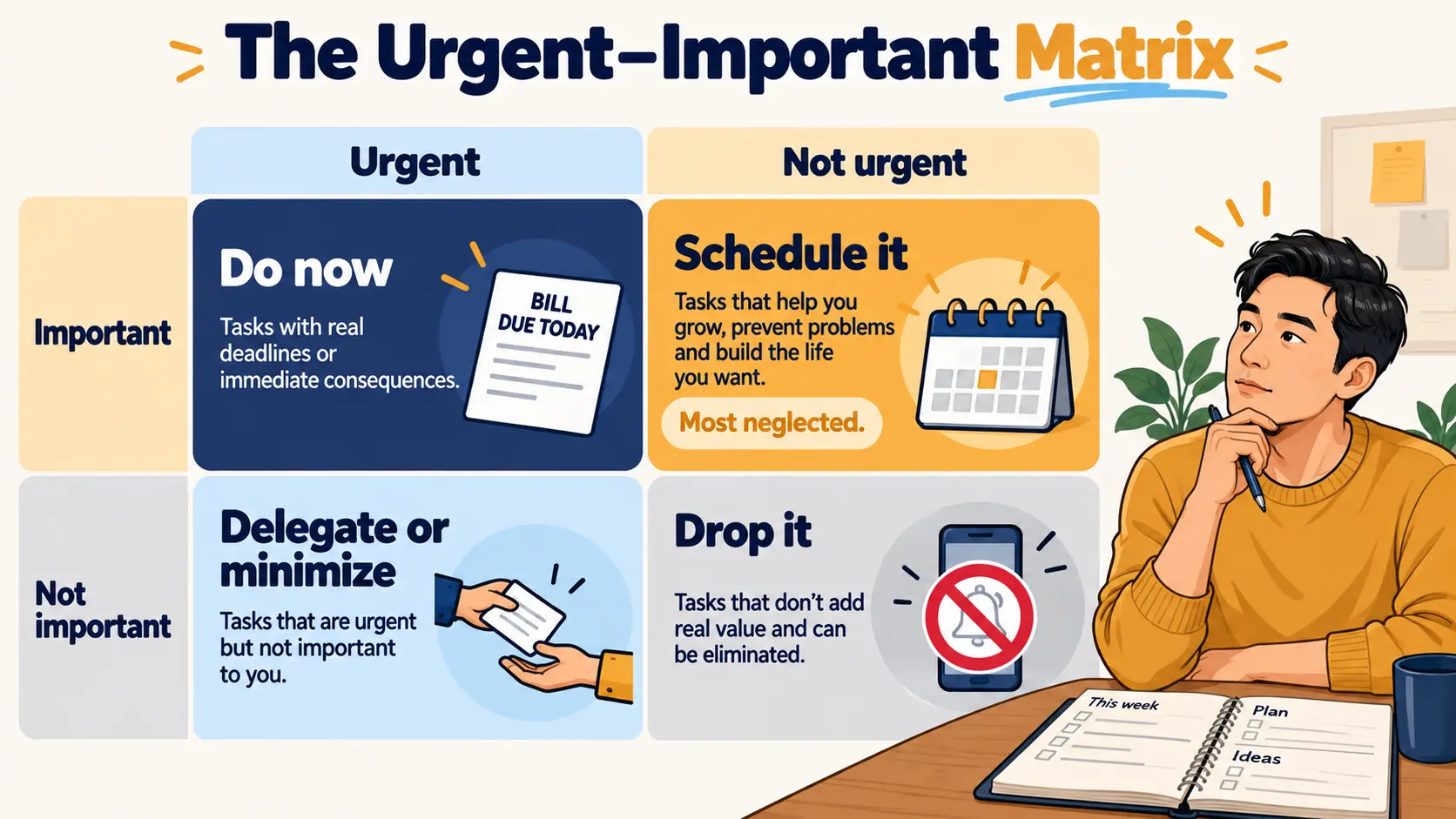
The priorities themselves belong to the client. The organizer offers a framework and asks questions that link tasks back to the client's goals; the client decides what matters most.
Planning and Time Management
Planning turns priorities into time. A simple, reliable planning cycle looks like this:
- Capture everything in one trusted place. A single task list or planner the client checks every day. Tasks spread across sticky notes, three apps and an inbox can't be prioritized.
- Review weekly. Look back at what got done, look ahead at the calendar, and choose the week's priorities.
- Plan daily. Pick the day's most important tasks and match them to the time available.
- Schedule, don't just list. Putting important tasks on the calendar (time blocking) makes them real commitments.
The weekly review in practice
The weekly review is the habit that holds the whole system together. A simple version takes 20–30 minutes:
- Empty the inboxes — paper tray, email, notes — into the task list or files.
- Look back at last week's calendar for loose ends and follow-ups.
- Look ahead at the next week or two: deadlines, appointments, preparation needed.
- Choose priorities for the coming week and block time for them.
Tying it to an existing routine — Sunday evening, Friday afternoon — helps it stick (Lesson 13).
Making time estimates realistic
Most people underestimate how long tasks take — often called the planning fallacy. Building in buffer time, tracking how long recurring tasks really take, and leaving gaps between appointments help plans survive contact with real life. Batching similar tasks (all calls in one block, all errands in one trip) reduces the time lost switching between them.
Choosing tools that fit
Paper planners, wall calendars, phone apps and shared digital calendars all work — for the right person. The assessment from Domain II guides the choice: the client's technology skills, learning style, and what they already use. A good recommendation is usually fewer systems, used consistently. Adding a new app on top of three existing ones is the productivity version of buying containers before sorting.
| Tool | Often suits | Watch for |
|---|---|---|
| Paper planner | Clients who think by writing; low-tech preference | Not shareable; can be left behind |
| Wall calendar | Households; visual clients; children's schedules | Only useful where it's seen |
| Digital calendar | Busy schedules; reminders; mobile access | Needs the skills and habit to check it |
| Shared family calendar | Coordinating several people | Everyone has to use it — or it fails |
| Task app | Confident tech users with many projects | Becoming one more place tasks hide |
Time management also overlaps with a client's energy and health. Organizers can help schedule demanding tasks for the client's best hours, but persistent problems with focus, attention or exhaustion are a reason to suggest the client talks to a qualified professional — not something to diagnose.
Exam Traps for IV.A.7–9
| If an answer… | …it's probably wrong because |
|---|---|
| Recommends a new app before consolidating | Consolidate into one trusted place first |
| Files action papers away in a drawer | Action needs to be visible and reviewed |
| Keeps bills and warranties in one pile | Separate action from reference |
| Tells the client to keep tax records for a set number of years | Retention varies — refer |
| Accepts "get organized" as the goal | Make it specific and measurable |
| Decides the client's priorities | The organizer offers tools; the client decides |
| Plans back-to-back with no gaps | The planning fallacy needs buffer |
| Suggests the client may have an attention disorder | Don't diagnose — suggest a professional |
10 questions in the style of the CPO exam. Score 70%+ to mark this lesson complete.
- Every workflow has four stages: capture in one place, process with one decision per item on a schedule, act or store, then archive or release.
- Separate action papers (need a next step) from reference papers (need keeping); keep action files visible and reviewed often — a paper station at the point of use puts this into practice.
- Retention periods depend on country and circumstance — organizers set up the system and refer retention questions to the right professional.
- Turn vague goals into SMART goals, and pair outcome goals with process goals the client controls.
- Prioritization tools — the urgent–important matrix, ABC ranking, most important tasks — help, but the client sets the priorities.
- Plan in a cycle: one trusted capture system, a weekly review, daily priorities and time blocking, with buffer for the planning fallacy — and tools that fit the client: fewer systems, used consistently.
Before moving to Lesson 13:
- Count every place a task or paper can land in your own life — trays, apps, notebooks, inboxes. How many are there?
- Sort ten papers or emails using the five processing decisions.
- Rewrite one of your own vague goals as a SMART goal with a matching process goal.
- Complete the knowledge check above and review any question you missed.