Hands-on organizing follows a reliable order: bring like items together, sort them into categories that make sense to the client, and edit out what's no longer needed — physical and digital — before anything gets stored. Through all of it, the client makes the decisions. The organizer's skill is making those decisions easier and teaching the process so the client can repeat it without help.
Domain IV, Project Implementation, is where the plan from Domain III turns into real work — and at 31% it's the single biggest domain on the CPO® exam. The outline frames the first part of it as teaching, transferring and applying organizing and productivity fundamentals. That wording matters: the exam isn't only asking whether you can organize a room. It's asking whether you can help a client understand the process well enough to keep using it after you've left.
This lesson covers three of those fundamentals together, because in practice they happen in the same session: consolidating, sorting and categorizing (IV.A.1), eliminating physical and digital excess (IV.A.2), and decision-making (IV.A.5). Lesson 11 picks up what comes next — containers, space and function.
Free on YouTube Subscribe to get every lesson video in this course SubscribeThe Order That Makes Organizing Work
Most failed organizing projects go wrong in the same way: storage gets solved before the stuff does. Someone buys a set of matching bins, fills them with whatever is already there, and six weeks later the bins are full and the clutter is back. Professional organizers avoid this by following a fixed order. (Popular consumer methods follow the same logic — see Swedish death cleaning vs KonMari.)
- 1. ConsolidateGather every item of one type into one place, wherever in the home (or on whatever device) it currently lives.
- 2. Sort and categorizeGroup the items into categories that reflect how the client uses them, and give each item a clear destination.
- 3. Edit (eliminate excess)With the client deciding, remove what's broken, duplicated, unused or no longer wanted — and get it out of the space.
- 4. Then storeOnly now choose containers and locations, sized to what's actually staying. That's Lesson 11.
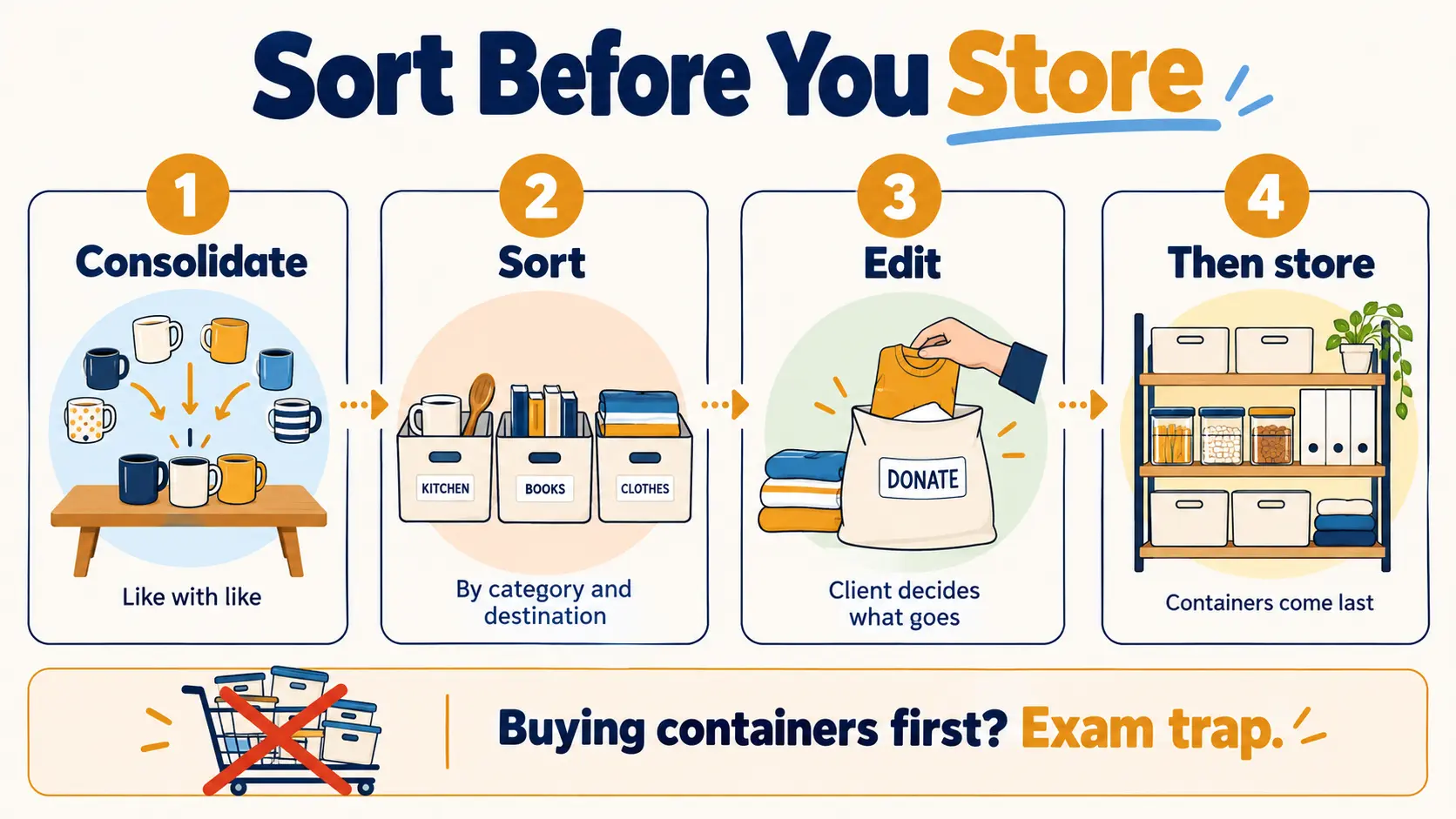
Sorting and editing often overlap — many people make keep-or-go decisions as they sort — but consolidating always comes first, and storage always comes last. On the exam, an answer that starts with buying containers, measuring shelves or designing a system before the items have been sorted and edited is almost always a trap.
Consolidate: Like With Like
Consolidating means bringing together everything in a category — all the phone chargers, all the scissors, all the tax paperwork, all the photos spread across three devices — before deciding anything about it. It does three useful jobs:
- It shows the true volume. Clients rarely know they own eleven water bottles until all eleven are on the table. That visible total does more to motivate change than any advice.
- It exposes duplicates. Repeat purchases are a common sign that a client couldn't find what they already had — useful information for the system you'll design.
- It makes decisions comparative. Choosing "the best three of eleven" is far easier than judging each bottle on its own.
Consolidation needs a clear staging area: a cleared table, a section of floor, or a set of labelled boxes. Keep the scope manageable. For a client who's easily overwhelmed, consolidating one category from one room is a better first session than pulling every item of clothing in the house onto the bed.
Sort and Categorize
Once items are gathered, they're sorted into groups. Two kinds of sorting happen at the same time: sorting by category (what the item is) and sorting by destination (where it's going next).
Destination sorting
A simple, consistent set of labelled piles or boxes keeps a session moving. The exact labels vary between organizers, but most use some version of these:
| Destination | What goes there | Handle it… |
|---|---|---|
| Keep | Items the client uses, needs or values and wants to keep in this space | Sort into categories, then store (Lesson 11) |
| Relocate | Keepers that belong in a different room or with a different person | At the end of the session, not mid-sort |
| Donate / sell | Usable items the client is ready to pass on | Bag, label and remove promptly (Lesson 8) |
| Recycle / discard | Broken, expired or unusable items | Following local disposal rules |
| Shred | Documents with personal or financial information | Securely, never in household recycling |
| Undecided | Items the client can't decide on yet | Contain, date and revisit (see below) |
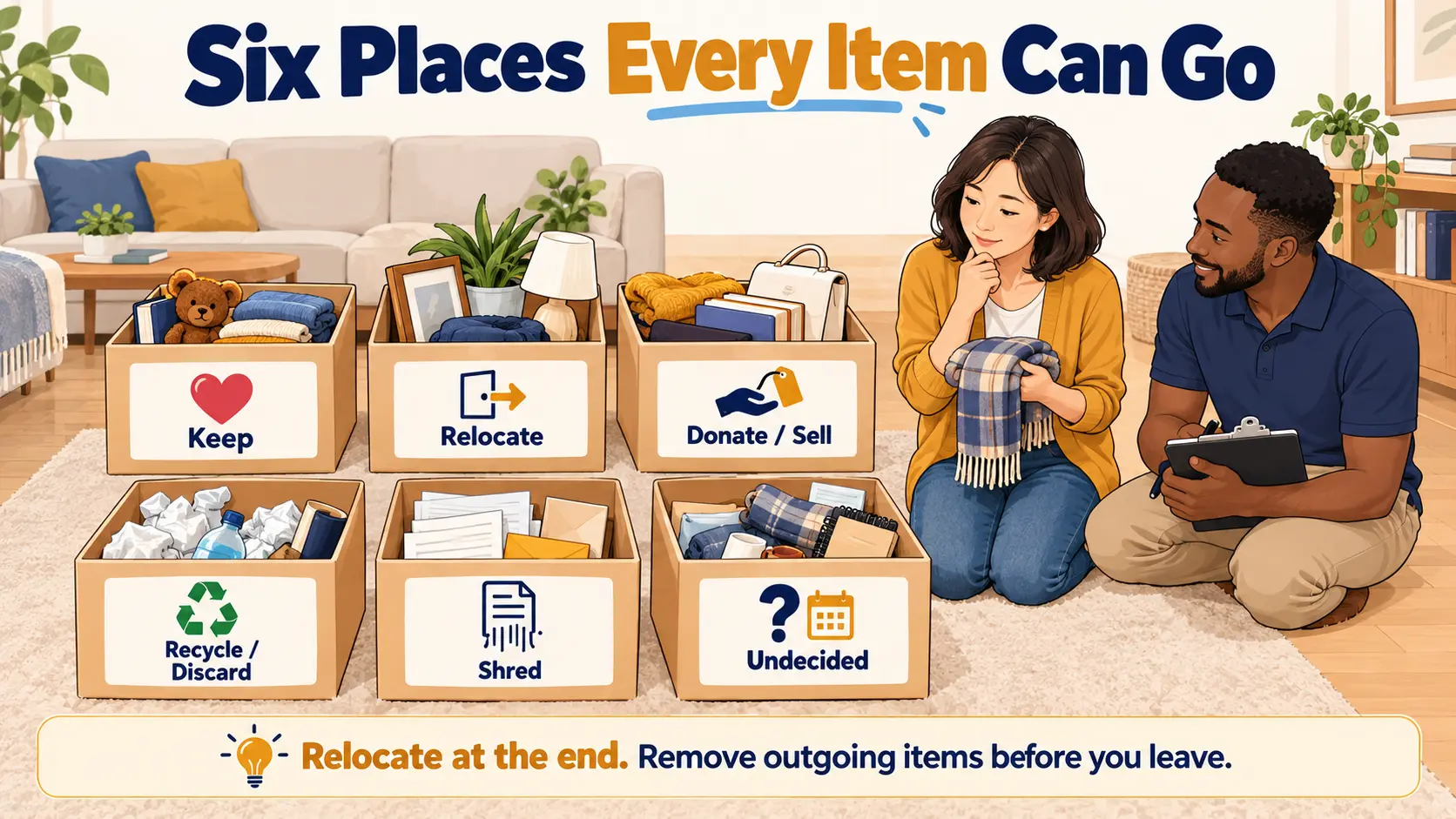
Two habits matter here. First, relocate items at the end, not the moment they turn up — walking a stray mug to the kitchen mid-session is how a bedroom project quietly becomes a whole-house project. Second, get outgoing items out of the space before the session ends where possible. Donation bags left in a hallway have a way of being unpacked again.
Category sorting
Keepers are then grouped into categories. Good categories are the ones the client will recognize and use — not the organizer's personal system. Common ways to group items include:
- By type or functionWhat the item is or does — baking tools, first-aid supplies, warranties. The most common starting point.
- By userWho uses it — each child's art supplies, a partner's work files. Useful in shared spaces.
- By frequency of useDaily, weekly, seasonal, rarely. Drives placement later: everyday items go in the easiest reach.
- By activityEverything for one task together — a gift-wrapping kit, a bill-paying station, a travel bag.
Start broad and narrow down only as far as the client needs. "Kitchen tools" might be enough for one person; a keen home cook may want "baking", "knives", "measuring" and "serving" as separate groups. Too many categories create a system that's hard to maintain — and maintaining it is exactly what Domain V will ask about.
By category or by room?
Organizers work either through a home one room or zone at a time, or one category at a time across the whole home. Each has a place:
| Room by room (or zone by zone) | Category by category | |
|---|---|---|
| Strength | Visible progress in one space; easy to schedule; less overwhelming | Reveals full volume and duplicates across the home |
| Watch-out | The same category turns up again in other rooms | Can create a lot of mess at once; harder for easily overwhelmed clients |
| Often suits | Busy clients, small time slots, clients who need early wins | Clothes, books, paperwork and other categories spread throughout a home |
Neither is "correct". The right choice follows the assessment from Domain II: the client's energy, time, space and goals. For more on the room-by-room approach, see our guide to decluttering your home room by room.
Eliminating Physical Excess
The outline's wording is "eliminate physical and digital excess" — not "get rid of as much as possible". Excess is defined by the client's goals and space, not by a target number. A family that hosts large gatherings may genuinely need forty glasses; a person living alone in a studio may not.
Useful criteria to offer a client (not rules to impose) include:
- Use: have you used it in the last year — or will you, for something specific?
- Duplicates: if you have several, which ones would you reach for first?
- Condition: does it work, and is it worth repairing?
- Space: how much room does this category get? The space is the limit — if the shelf holds twenty books, the decision is which twenty.
- Replaceability: if you needed it again, how easily and cheaply could you get it? (The idea behind the 90/90 rule.)
Treating the space as the limit — sometimes called the container concept — is one of the most useful ideas in organizing. It replaces an endless debate about each item ("but I might need it") with a bounded, practical choice ("which ones earn their place?").
Eliminating Digital Excess
Clients now live with as much clutter on their devices as in their cupboards: thousands of photos, inboxes in the tens of thousands, files saved in five different places, and subscriptions nobody remembers signing up for. The outline puts digital excess right alongside physical excess, and the same sequence applies.
- Back up firstBefore deleting anything, make sure important files and photos exist somewhere safe. Digital deletions can be permanent.
- ConsolidateBring files from desktops, downloads folders, old laptops and phones into one agreed location.
- Sort into a simple folder structureA few broad folders the client understands, with a consistent naming habit (for example, year–month–description).
- EditRemove duplicates, blurred photos, outdated downloads and unused apps; unsubscribe from unwanted email.
Digital work brings one extra responsibility: the client's information is private. An organizer only accesses devices, accounts and files with the client's clear permission, never asks for or keeps passwords they don't need, and leaves the client in control of what's deleted. Lesson 18 covers privacy and cybersecurity in more detail. For hands-on techniques, see our guides to decluttering digital photos and getting email under control.
Decision-Making: Helping Without Deciding
Decision-making is listed as its own fundamental in the outline, and for good reason: sorting is simple, but deciding is hard. A single closet can involve hundreds of small decisions, and each one draws on the same limited mental energy. By late in a long session, many clients start keeping everything — or giving everything away — just to be done. This is often called decision fatigue.
The client decides
This is the principle behind most CPO exam questions on this topic. The organizer guides, asks and suggests; the client decides what stays and what goes. An organizer never throws something away because it "obviously" should go, never removes items without agreement, and never shames a client for wanting to keep something. Respecting client autonomy is both an ethical obligation (Lesson 17) and a practical one: decisions people make themselves are the ones that stick.
Making decisions easier
The organizer's tools are questions, criteria and pacing:
| Helpful | Less helpful |
|---|---|
| "When did you last use this?" | "You don't need this, do you?" |
| "Which of these would you keep if you could only keep two?" | "Why do you have so many of these?" |
| "What would you like this space to feel like when we're done?" | "This is a lot of stuff." |
| "Would it help to keep a photo of it instead?" | "Just let it go." |
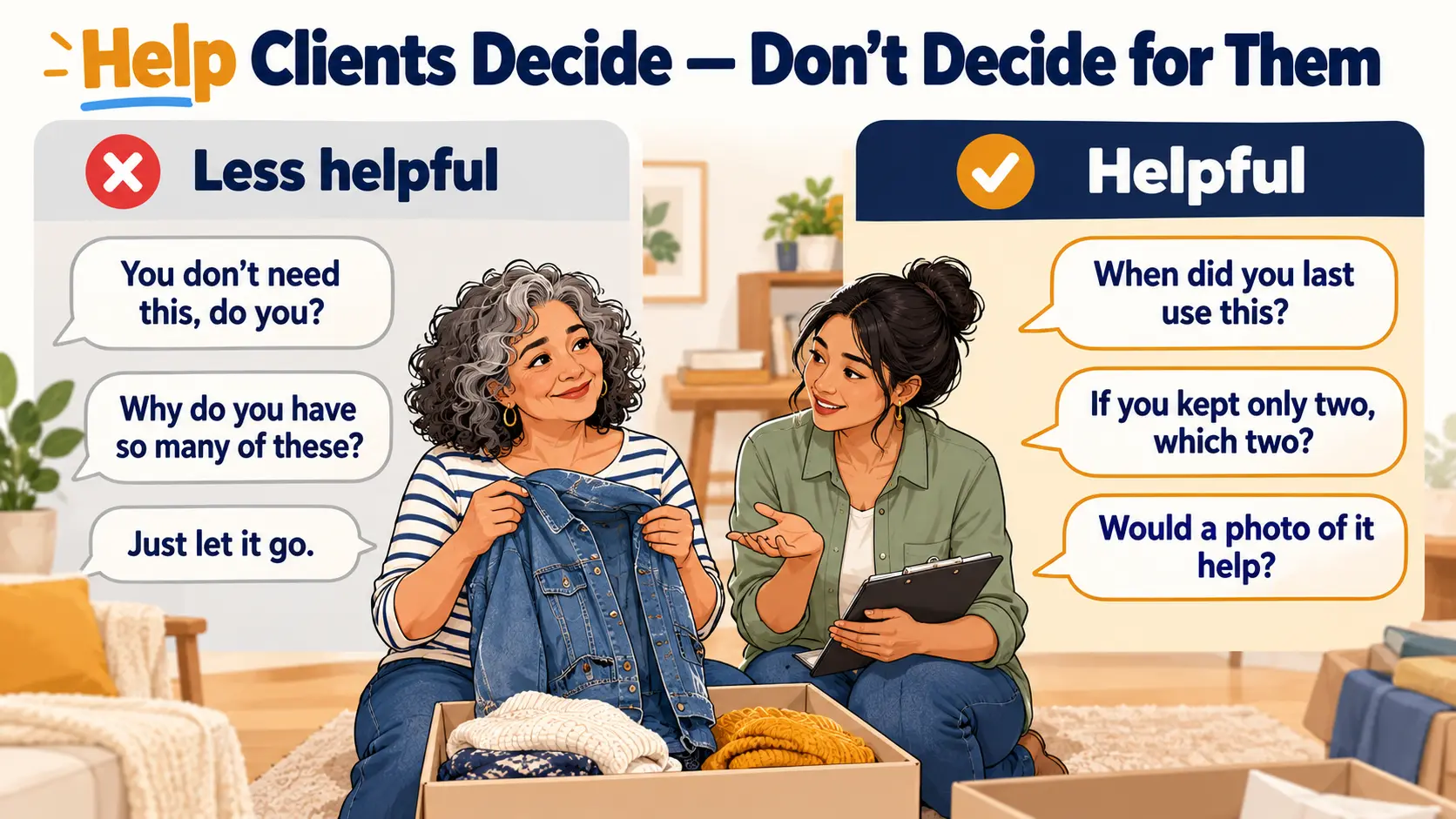
Pacing matters as much as wording. Start with easier categories to build momentum, schedule shorter sessions or breaks for clients who tire quickly, and connect decisions back to the client's own goals from Domain I: "You said you wanted the guest room usable by December — does this help with that?"
Sentimental items and the undecided box
Sentimental items are usually the hardest decisions, so it helps to leave them until the client has built some decision-making momentum. Options that respect the attachment include keeping a representative few, displaying one meaningful item rather than storing a box, or photographing items before letting them go. Our guide to letting go of sentimental clutter goes deeper.
For items the client genuinely can't decide on, an undecided box works well: contain the items, label the box with a review date, and revisit it later. It keeps the session moving without forcing a choice — and many clients find, at the review date, that the decision has made itself.
When to slow down or refer
Some reluctance is normal. But if a client shows intense distress at letting anything go, if decisions seem impossible across every category, or if the situation raises health or safety concerns, the organizer's job changes. Slow down, keep the client in control, and don't push through. Where it seems a client may need more support than organizing alone can give, encourage them to speak with a qualified professional. Professional organizers don't diagnose or treat health conditions — Lesson 5 covers recognizing these considerations and working alongside other professionals.
10 questions in the style of the CPO exam. Score 70%+ to mark this lesson complete.
- The order is consolidate → sort and categorize → edit → store. Containers and systems come last.
- Consolidating like with like shows the true volume, exposes duplicates and makes decisions comparative.
- Destination sorting (keep, relocate, donate or sell, recycle or discard, shred, undecided) keeps a session moving; relocate at the end and remove outgoing items promptly.
- Categories should match how the client uses things — by type, user, frequency or activity — and stay as simple as the client needs.
- Excess is defined by the client's goals and space. Treating the space as the limit turns endless debates into bounded choices.
- Digital decluttering follows the same sequence, with a backup first and the client's permission for any access.
- The client decides. The organizer makes decisions easier with questions, criteria and pacing — and slows down or refers when distress or safety concerns go beyond organizing.
Before moving to Lesson 11:
- Pick one small category in your own home — chargers, pens, mugs — and consolidate every one of them in one place. Count them.
- Sort them using the six destinations above, and notice which decisions felt easy and which didn't.
- Write down three neutral, open questions you could ask a client who's stuck on a decision.
- Complete the knowledge check above and review any question you missed.